The Complexity Problem
California's water regulatory landscape: a maze of agencies, permits, and programs that overwhelms the people who need it most.
What if we could give every Californian access to the equivalent of a water regulation expert, 24/7, for free?
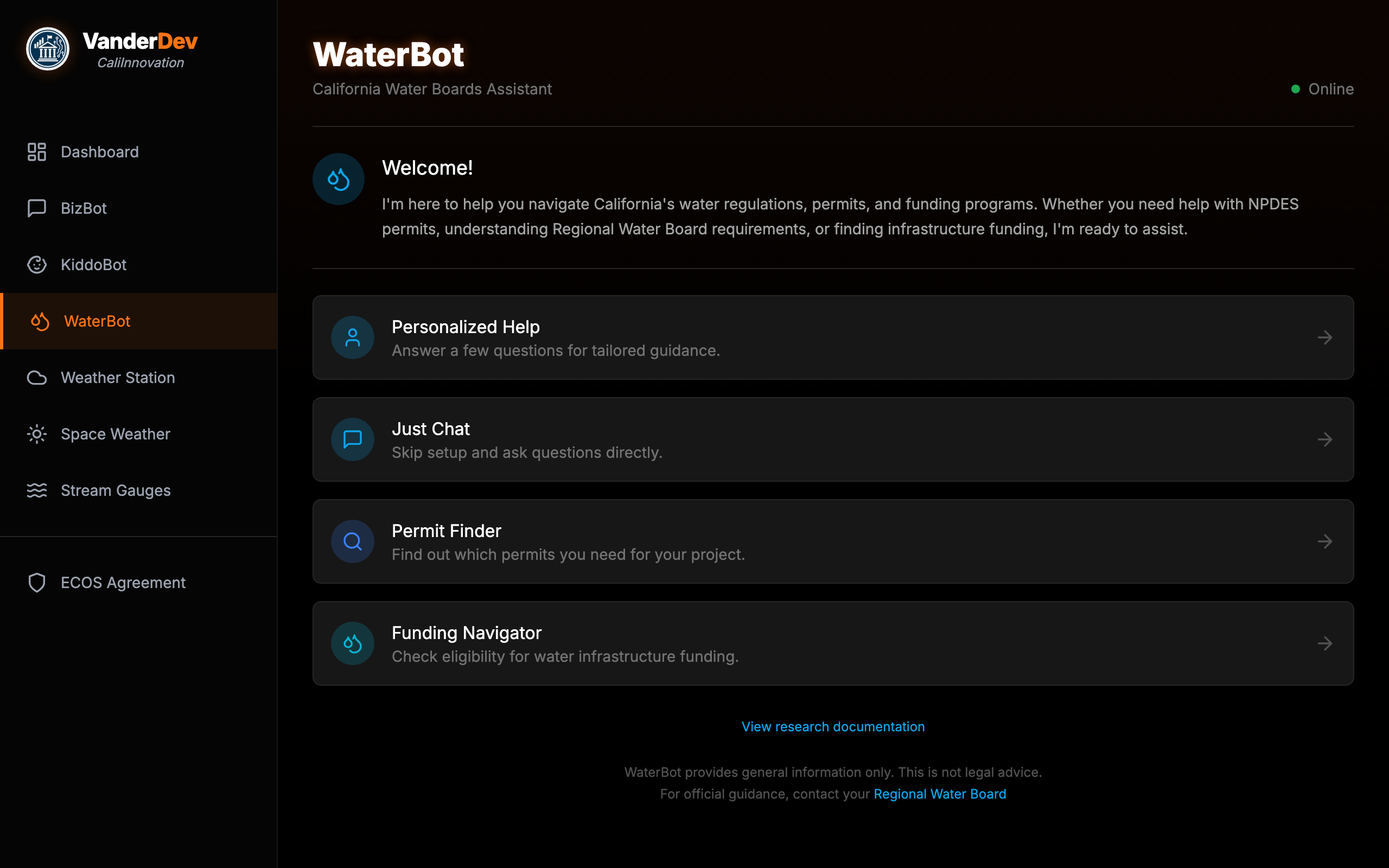
Meet WaterBot
A live, production AI assistant for California Water Boards — four ways to get help.
1 2 3 4 5
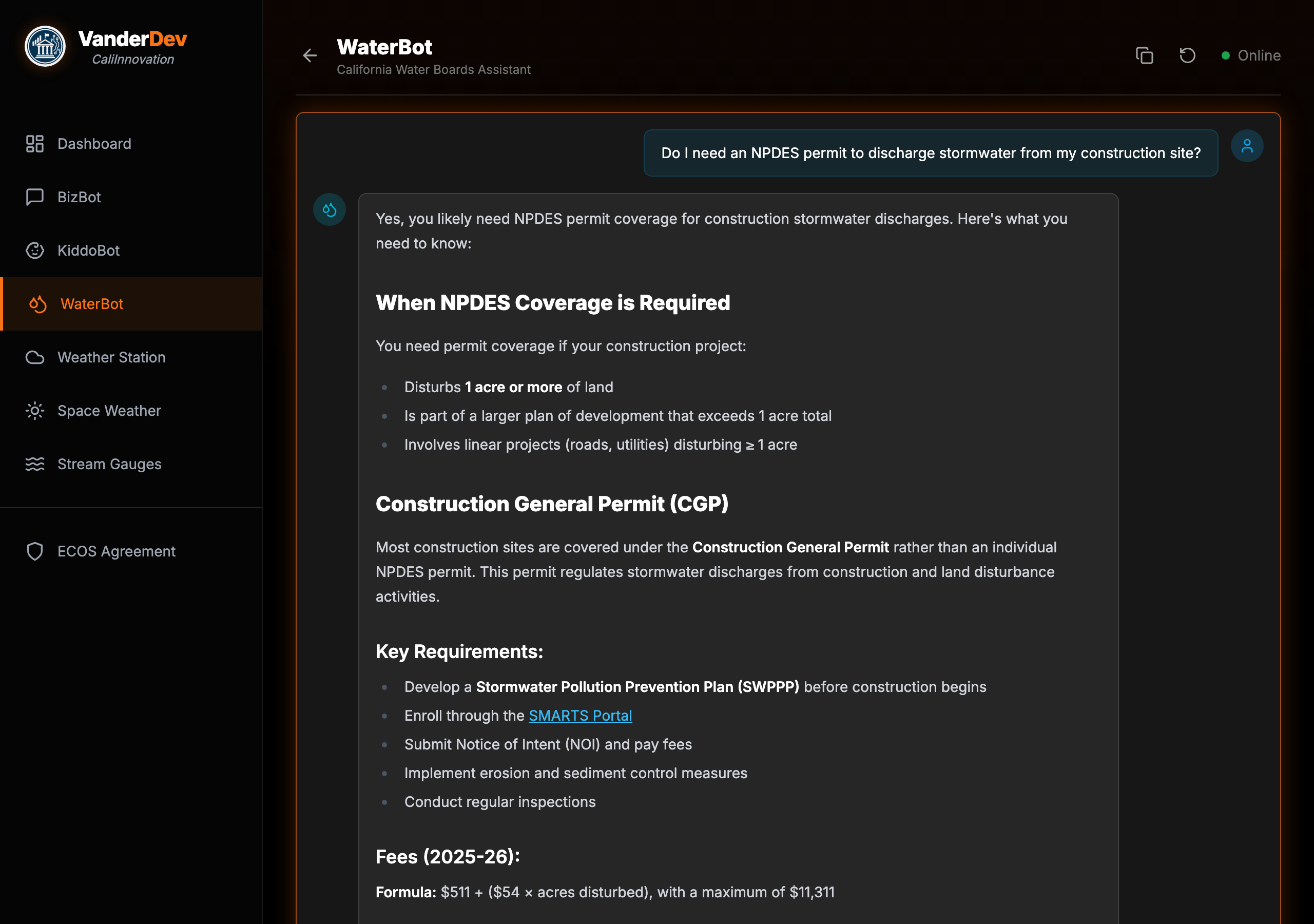
WaterBot in Action
A real conversation — user asks about NPDES permits, WaterBot responds with structured guidance and official links.
1 2 3 4
The Full Experience
Personalized Help mode walks users through a 5-step intake so the AI knows their situation before answering.
Construction, agricultural, municipal, industrial, or habitat restoration
County selection → maps to the correct Regional Water Board
Type and volume — determines which permits apply
Existing rights? Federal permits? Changes the regulatory path.
Business, individual, or municipality — plus DAC status for funding eligibility
The Permit Decision Tree
An interactive decision tree built from a 107KB JSON structure covering every permit pathway.
How Most People Find Permits
- Google "California water permit"
- Land on the wrong Regional Board site
- Still not sure which permit applies
- Give up and call a consultant
How the Decision Tree Works
- Answer 4-6 plain-language questions
- Get the specific permit type you need
- Direct link to the application portal
- Total time: under 2 minutes
The Funding Navigator
58 state and federal funding programs, matched by answering 5 plain-language questions — no AI hallucination risk.
How Most People Find Funding
- Google scattered agency sites
- Read 200-page NOFAs
- Miss programs they qualify for
- Give up and hire a grant writer
How the Navigator Works
- Answer 5 questions: org type, project, population, DAC status, matching funds
- Get tiered results: Eligible, Likely, May Qualify
- Direct links to applications
- AI enriches results with tips — but matching is deterministic
How It Actually Works: RAG
How It Works
RAG — Retrieval-Augmented Generation. Think of it as giving the AI a research assistant who pulls the right files before speaking.
Without RAG
- AI answers from memory (training data)
- Can't cite specific sources
- Hallucinates confidently
- "I think the permit fee is around..."
With RAG
- Searches a curated knowledge base first
- Every claim cites a real source
- Knowledge updates without retraining
- "The CGP fee formula is $511 + ($54 × acres)"
The Full Architecture
Six systems cooperate in about 2-3 seconds. None are exotic — React, PostgreSQL, and webhook APIs.
alwaysOutputData: true prevents silent pipeline death on zero results. escapeBraces() in prompt templates avoids n8n expression collisions. Top-K = 8 chunks.
The Stack
Every component is open-source or free-tier.
The Knowledge Base
Knowledge Engineering
The knowledge base is the product. The LLM is a commodity.
Every fact is sourced from official California Water Boards publications with direct URLs.
Inside the Knowledge Base
| Category | Coverage |
|---|---|
| Permits & Compliance | NPDES, WDR, 401 Cert, MS4, enforcement |
| Funding Programs | CWSRF, DWSRF, SAFER, Prop 4, federal grants |
| Regional Boards | All 9 regions — jurisdictions, contacts, priorities |
| Water Quality | TMDLs, impaired waters, beneficial uses |
| Pollutants | PFAS, lead, arsenic, nitrate, chromium-6 |
| Consumer FAQ | Tap safety, CCR reports, billing, hard water |
| Conservation | Usage targets, drought rules, Save Our Water |
Why Chunking Strategy Matters
If you chunk badly, your retrieval will be bad — and no LLM can fix bad retrieval.
Wrong: Arbitrary Splitting
Split every 500 characters regardless of content:
Information split mid-sentence. Related content scattered.
Right: Semantic Splitting
Split on H2 headers — each chunk is a complete thought:
Complete section stays together. Self-contained and retrievable.
Quality Assurance Pipeline
This pipeline is what separates a demo from production.
Split on meaning, not character count. H2 headers define chunk boundaries.
OpenAI text-embedding-3-small → 1,536-dimension vectors per chunk.
MD5 hash check — duplicate chunks are invisible poison for retrieval.
313 URLs tested. Dead links destroy credibility.
35 real-world queries from Reddit and forums — NOT self-generated.
Find what's missing, add content, re-embed, repeat until 100%.
Testing with Real Questions
We measure cosine similarity — how closely a user's question matches content in the knowledge base. 0.0 = no match, 1.0 = identical. Above 0.40 means the system found relevant content to answer from.
Sample Results
| Real-World Query | Score | Verdict |
|---|---|---|
| "Recycled water regulations California" | 0.79 | STRONG |
| "TMDL pollution limits explained" | 0.76 | STRONG |
| "SAFER funding eligibility" | 0.72 | STRONG |
| "How do I report a sewage spill?" | 0.51 | STRONG |
| "Is chromium-6 in my tap water?" | 0.63 | STRONG |
All 35 queries sourced from outside the content creation process. Non-circular methodology.
What Testing Revealed
Experts build knowledge bases that answer expert questions. Real users ask beginner questions.
Before: 64% Coverage
- Strong on permits and enforcement
- Good on regional board jurisdictions
- Missing: "Is my tap water safe?"
- Missing: "How do I read my water bill?"
After: 100% Coverage
- Added 25 consumer FAQ documents
- Added conservation program guides
- Chromium-6: 0.34 → 0.63
- Water billing: new → 0.52
Less Is More: The Clean-Slate Rebuild
The counterintuitive move that made WaterBot production-ready.
Trust Architecture
Every design decision in WaterBot prioritizes accuracy and transparency.
Every response links to original documents. 313 URLs to official waterboards.ca.gov pages.
System prompt: "Answer using ONLY the provided context." No creative fill-in.
"This is not legal advice. For official guidance, contact your Regional Water Board."
No login. No personal data stored. Session state lives in the browser only.
Infrastructure
The Docker Stack
25 Docker containers on a single VPS:
- n8n — Workflow automation
- Supabase — PostgreSQL + pgvector, Auth, REST API
- nginx-proxy — SSL/TLS via Let's Encrypt
- Tailscale — Encrypted mesh networking
- Portainer — Container management UI
Backups follow the 3-2-1 rule: local, remote sync, offsite cloud.
Monitoring
Real-time health monitoring:
- Prometheus — Metrics collection (4 targets)
- Grafana — Visual dashboards (109 panels)
- Uptime Kuma — Health checks every 60 seconds
- ntfy — Push notifications on failure
Alerts fire in under 2 minutes. Full rebuild from scratch in under an hour via Docker Compose.
One Pattern, Three Bots
The same architecture powers two other chatbots — proving the pattern is reusable.
Same Infrastructure
- Same PostgreSQL + pgvector database
- Same n8n workflow pattern
- Same OpenAI embedding model
- Shared component library — ChatMessage, DecisionTreeView, RAGButton all reused
Different Domains
- WaterBot — Water regs + permits + funding navigator
- BizBot — Business permits + license finder
- KiddoBot — Childcare resources + program finder
- Each has its own KB, test suite, and specialized tools
Lessons Learned
Every "don't" below is something we did and had to fix.
Do
- Spend 80% of time on the knowledge base, 20% on technology
- Test with real user queries from outside your team
- Use semantic chunking — split on meaning, not character count
- Start with a narrow domain and go deep, not wide
Don't
- Assume more data means better answers — noise drowns signal
- Test with questions you wrote yourself — that's circular testing
- Skip deduplication — duplicate chunks are invisible poison
- Launch without URL validation — dead links destroy credibility
Your Blueprint
Your Turn
WaterBot was built in about 20 hours by one person. Here's the breakdown.
"All of Caltrans" is too wide. "Encroachment permits for District 4" is right. Write markdown files with source URLs — this is the bulk of the work.
PostgreSQL + pgvector (Supabase = one container). Split on headers, embed with OpenAI, load. A 50-line script.
n8n webhook wires the pipeline visually. React chat UI POSTs to your webhook. No server code.
Deduplicate. Validate URLs. Test with real queries from outside your team. Find gaps, add content, retest.
Resources
Try WaterBot now — vanderdev.net/waterbot
Open source — The knowledge base and frontend are available on GitHub
Related Training:
- Module 1: Perplexity AI for Government — Research tools
- Module 2: GitHub for Non-Coders — Collaboration
- Module 5: RAG Quality Assurance — QA methodology
Tools Used:
- n8n.io — Workflow automation (open source)
- supabase.com — Database + pgvector (open source)
- openai.com — Embeddings API
- anthropic.com — Claude API (LLM)